
TVRemoteX for iPhone
TV remote widgets and Siri shortcuts for iPhone
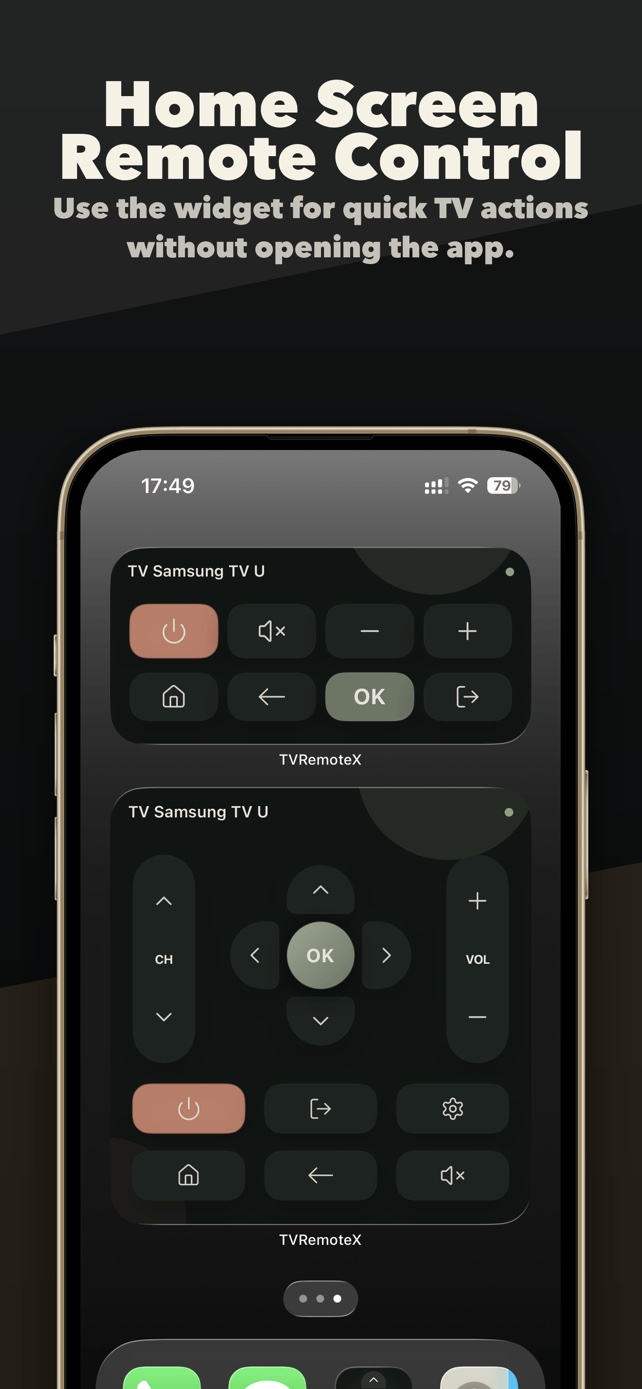
Reach supported TV controls from an iPhone Home Screen widget or ask Siri to send a command. Connect the TV in TVRemoteX first, then try the same action while it is awake.
Free download with in-app purchases. Home Screen widgets and selected advanced controls may require a purchase. The app shows available access, any trial allowance and purchase options.
Check the TV connection first
Keep the iPhone and TV on the same reachable home network. In TVRemoteX, connect to the TV and test a simple command such as Home or mute. Finish any pairing and permission prompts before adding shortcuts.
If the command fails inside the app, using Siri or a widget will not remove the underlying TV or network restriction. Start with the TV setup guide.
Add a Home Screen widget
- Connect to the TV in TVRemoteX at least once and verify the control you want to use.
- On the iPhone Home Screen, touch and hold an empty area, open the edit controls and choose Add Widget. Wording can differ by iOS version.
- Find TVRemoteX, choose a widget size and add it to the Home Screen.
- Check the television shown by the widget before sending a command. Open TVRemoteX and reconnect if its saved device or connection state needs refreshing.
- Try one supported command while the TV is on. Test standby wake separately, after confirming the model's network-wake settings.
Set up Siri and Shortcuts
- Open TVRemoteX and connect to the television you want to control.
- Open the Siri voice control page in the app's settings, then choose TVRemoteX Shortcuts.
- In Shortcuts, review the available TVRemoteX actions. Follow the app's Siri permission guidance if actions are unavailable.
- Try a supported command such as mute or volume while watching the TV. Standard shortcuts use the last-used TV when no device is specified.
- If you use several televisions, inspect the TV parameter in a custom shortcut and choose the intended device before running it.
Examples to try after connecting
These phrases are defined by TVRemoteX's English app shortcuts. Siri language, app version and TV capabilities affect which actions are available. Check the phrases displayed in your app.
| English Siri phrase | What to check |
|---|---|
| Mute the TV with TVRemoteX | Check the current mute state on the intended TV. Availability depends on the connected device. |
| Turn the volume up with TVRemoteX | Confirm that TVRemoteX can already change this television's volume. |
| Pause the TV with TVRemoteX | Use a playing source that accepts remote playback commands. |
| Turn off the TV with TVRemoteX | Confirm the target TV before running the command. Power off and wake are different capabilities. |
When a widget or Siri command does not work
| Symptom | Next step |
|---|---|
| The shortcut controls the wrong television | Reconnect to the intended TV or specify it in a custom shortcut. Check the selected TV again before using power commands. |
| Works in the app, fails from the widget | Open the app, reconnect, check feature access, then retry the widget. iOS can delay widget refresh and background work. |
| Siri does not find the action | Open the app's Siri page and the Shortcuts app. Check the available action names and follow the permission guidance. |
| Power off works but power on fails | Check the exact TV model's network-wake setting. Deep standby can make the TV unreachable even when control works while it is on. |
Questions and answers
Will Siri turn on any TV?
No. Wake depends on the TV's network-wake capability, settings and standby state. Turning a TV off successfully does not prove it can wake over the network.
Does this work away from home?
The setup described here uses a reachable local network. This guide does not promise remote control over the internet when you leave home.
Can I schedule an automatic TV shutdown?
A Shortcuts automation still depends on iOS execution, network reachability and TV command support. Test your setup; this guide does not guarantee unattended or timed shutdown.
Find your TV and get help
Sources and scope
Instructions describe TVRemoteX setup and platform conditions; they do not verify a particular television model. Read how these guides are maintained.